Mozey: Quotes, Contracts, and Invoices in One Place
Mozey handles the paperwork side of a one-person business. You write a quote, turn it into a contract the client signs on screen, invoice against that contract, and scan receipts as the year goes.
The totals come out the other end shaped like a Schedule C, the form sole proprietors use to report business profit.
Disclosure: I run Mozey.
Right now the whole thing is free. Mozey is in Early Access, and the first 100 founding members get every feature unlocked at no cost. Everything on this page was read off https://mozey.co on September 11, 2026.
What it actually does
Six things, and they are meant to be six parts of one job rather than six products.
Quotes and contracts. You describe the work and it drafts the agreement, which the client signs electronically. No printing, no scanning back.
Smart invoicing. Create, send, and track, with automatic reminders on the ones nobody has paid.
Receipt scanning. Photograph the receipt and OCR — optical character recognition, software reading text off an image — pulls the vendor, date and amount out and files it in a category.
Tax management. Federal and state calculation, quarterly estimates, and a Schedule C export.
Mileage tracking. A GPS log built to the format the IRS asks for, which is date, miles, and business purpose per trip.
An AI assistant that answers questions about your own numbers.
| Feature | What it does | What it replaces |
|---|---|---|
| Quotes and contracts | AI-drafted, e-signature | A Word template and a PDF signing service |
| Smart invoicing | Send, track, auto-remind | A spreadsheet and a calendar reminder |
| Receipt scanning | OCR, auto-categorized | A shoebox |
| Tax management | Federal and state, Schedule C export | An April spreadsheet |
| Mileage tracking | GPS, IRS-format log | A notebook in the glovebox |
| AI assistant | Answers about your own numbers | Asking your accountant in June |
The dashboard is where those six meet. Revenue, expenses and net profit sit at the top, with recent invoices and their status underneath.
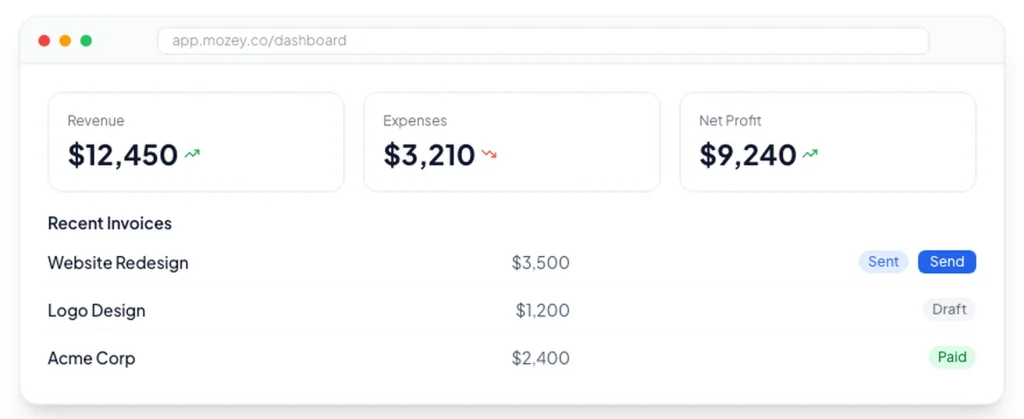
Revenue minus expenses is the figure Schedule C asks for, and most freelancers compute it once a year under pressure.
From quote to paid
The reason to keep these in one place is not that any single step is hard. It is that each one currently makes you retype the last one.
Your quote says $6,000. You retype $6,000 into a contract. You retype half of it into a deposit invoice, then the balance into a final invoice, then all of it into a spreadsheet in January.
Five copies of one number, each a chance to be wrong.
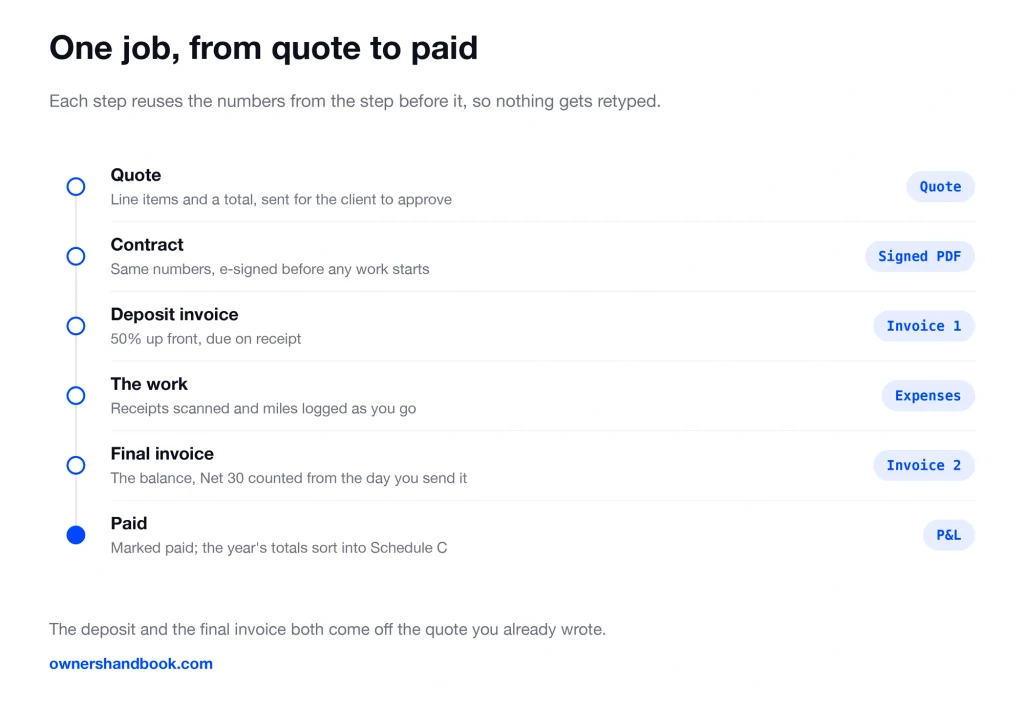
One habit in that flow is worth keeping whether or not you use any software. Ask for 50% before you start, because a client who has paid nothing is still deciding every week whether the project deserves their attention.
What Early Access actually means
The pricing page currently reads “Early Access Pricing.” The line under it says join as a founding member and get all features free, and that paid plans are coming soon.
There is a counter. As of today it says 99 of 100 spots remaining, and 1 of 100 founding member spots claimed.
All three plans show $0. Pro shows $19 struck through and Business shows $29 struck through, each labelled “Free during Early Access.”
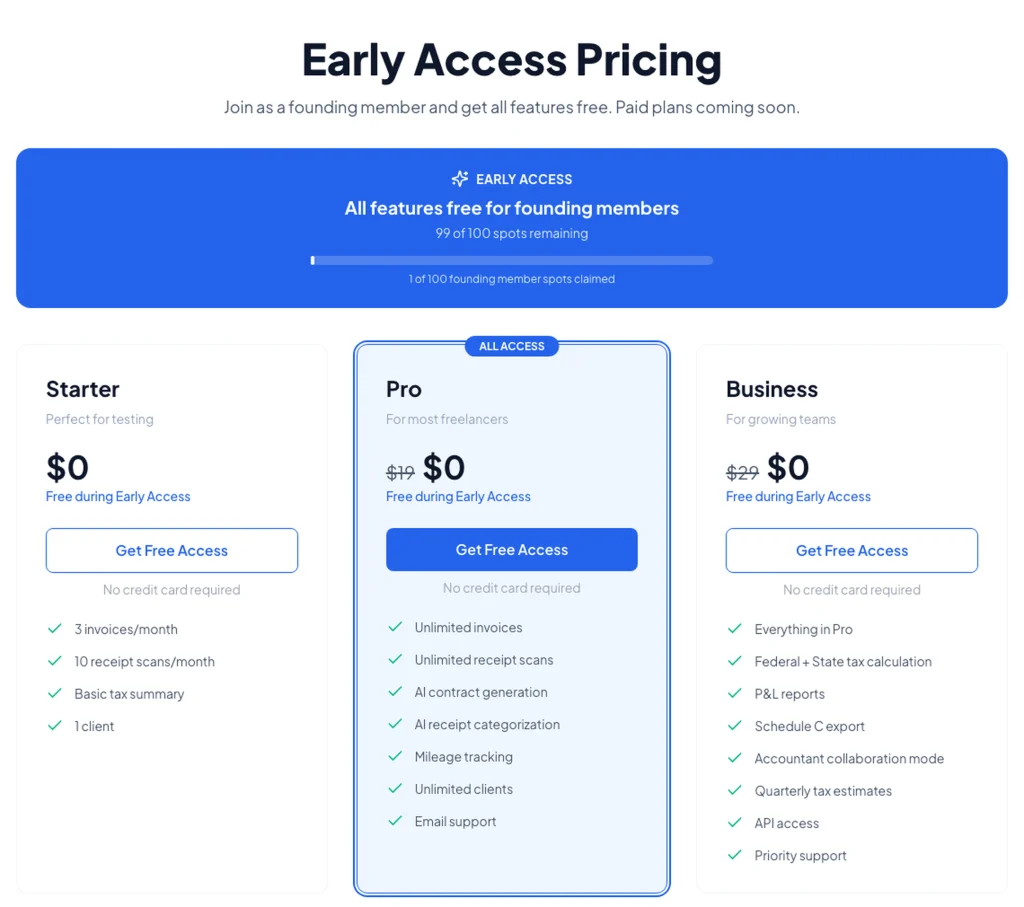
So there is no tier to choose. The Business feature set — state tax, Schedule C export, accountant mode, API access — is unlocked for everyone who gets in.
No credit card is asked for at signup. There is nothing to cancel, because there is no subscription to start.
The page also says early adopters will receive founding member pricing when paid plans launch. That is a stated intention, not a contract, so treat it as one.
What the tiers will cost when paid plans launch
The $19 and $29 figures are announced future prices, not current ones. Nobody is being charged them today.
The limits below describe what the tiers will be, not what you get during Early Access. A founding member gets everything in the Business column regardless of which card they click.
| Plan | Announced future price | Price today | What that tier is set to include |
|---|---|---|---|
| Starter | $0 | $0 | 3 invoices a month, 10 receipt scans a month, basic tax summary, 1 client |
| Pro | $19 a month | $0 during Early Access | Unlimited invoices, scans and clients, AI contracts, AI categorization, mileage tracking, email support |
| Business | $29 a month | $0 during Early Access | Everything in Pro, plus federal and state tax, quarterly estimates, P&L reports, Schedule C export, accountant mode, API access |
Still worth knowing which line would have caught you, because that is the line you meet later. One client decides it for most people, and two clients means Pro.
Ten scans a month is the tighter cap on Starter.
At a $75 hourly rate, $29 a month for a year is under five billable hours. That is the honest comparison — not against other software, but against the hours you spend doing this by hand.
The subscription, when there is one, is an ordinary business expense deductible on Schedule C. The after-tax cost lands around 70% of the sticker price.
The tax and records side
This is the part that will separate the $29 tier from the $19 one later, so it is worth being precise about what it does.
It calculates federal and state tax and produces quarterly estimates. It exports a Schedule C. It does not file anything for you — filing is still your software or your accountant.
That quarterly number is worth pausing on, because it has quietly become rare. Wave does not calculate it. FreshBooks does not. QuickBooks Solopreneur no longer advertises it either — that belonged to QuickBooks Self-Employed, the product it replaced. So the arithmetic most freelancers get wrong four times a year is, on the three best-known tools, still theirs to do. Doing it at all is unusual. Doing the state alongside the federal is more unusual still, and state is where the surprise bills come from.
The mileage log matters more than usual in 2026, because the rate changed mid-year.
Business miles are 72.5 cents through June 30 and 76 cents from July 1. A log that is not split at that date is worth less than you think.
On receipts: a scan is fine with the IRS as long as it is legible and complete. But keep them.
The default is three years after you file. Six years if you left out more than 25% of your gross income, and no time limit at all for a year you never filed.
Which means an export you can take with you is not a nice-to-have. Any tool holding six years of your records should let you get them out, and this one does.
It still earns its place if you hire an accountant
The usual assumption is that software like this is for people who do their own taxes, and that hiring someone makes it redundant. It is the other way round.
The IRS publishes a time estimate beside the Form 1040 instructions. A business filer spends about 21 hours a year on the return, and 10 of those are recordkeeping. That average is measured across every filing method, including every return filed by a paid preparer. So those ten hours do not disappear when you hire someone. They are the part nobody can do for you, and the IRS’s own data says so.
The reason is simple once you look at what a preparer actually receives. It is not a pile of receipts. It is categorized totals — the dozen or so numbers that land on a Schedule C. Your receipts stay with you, because they are not for the preparer at all. They are what you produce years later if the IRS asks.
That is the same split this tool is built around. The Schedule C export is the thing you hand over. The scans and the mileage log are the thing you keep.
There is a price attached to getting this wrong. Reconstructing a year of unkept books is sold as its own product, separate from filing: Bookkeeper360 lists prior bookkeeping at “starting at $1,000 per project,” and Bench charges $55 an hour plus a $1,200 onboarding fee. Arriving at a preparer with no books does not get you a higher hourly rate. It gets you a second invoice.
One more thing capture decides rather than records. Equipment at $2,500 or less can be expensed outright under the de minimis safe harbor. Above that, you are choosing between Section 179, bonus depreciation, and spreading it over years — and that choice is made on the return, using facts only you hold. A bank feed shows a preparer $3,200 and a store name. It cannot tell them what the machine is for or that you use it 80% for work. Miss that during the year and you do not lose a deduction, you lose the choice.
So the honest pitch to someone who already has an accountant is narrow and real: this does not replace them, and it is not trying to. It produces the thing they ask for and keeps the thing you are required to hold.
Who it fits
One person, no employees, billing clients by project or retainer. Designers, developers, consultants, photographers, writers, and gig drivers are the audience it is built around.
It fits best if the quote-contract-invoice chain is a real part of your week. If you write agreements for every job, that is where the time goes.
Past that, four situations decide it more than a job title does.
You drive to clients. Mileage is the deduction people lose most often, because a log has to be kept as you go and cannot be honestly rebuilt in April. In 2026 it also has to be split at June 30, when the rate moved from 72.5 cents to 76 cents.
Your state taxes income. Federal quarterly estimates are the number tools compete on. State is the one they skip, and it is where the April surprise usually comes from.
You buy equipment. Anything over $2,500 stops being a receipt and becomes a decision you make on the return, using the purchase date, the amount, and what share of the use is business. Capture those three at the time or lose the choice later.
You write agreements for every job. The quote becomes a contract becomes an invoice becomes a line on Schedule C, and today each of those steps makes you retype the last one.
Who this is not for
If you already run QuickBooks or Xero and only wish invoicing were nicer, do not move your books. Your bank feed, your categories, and your accountant’s access are all already there. Add an invoicing tool instead of replacing a general ledger.
If you hold inventory, this is the wrong shape. There is no stock tracking or cost of goods sold here.
If you have employees or contractors on payroll, same answer. No payroll, no W-2s, no 1099 filing for people you pay.
If you send two or three invoices a year, you do not need a subscription. A free invoice generator and a folder of PDFs is a complete system at that volume.
If you are an S-corp taking a salary through payroll, your reporting problem is not Schedule C and this is built around Schedule C.
And if you need deep double-entry accounting, a trial balance, or multi-entity books, that is a different category of software.
What to check before you sign up
Run a real month-end through it, not a demo. Send an actual invoice and scan an actual week of receipts.
Check your state. Tax calculation covers state as well as federal, but confirm it handles yours the way you expect before you rely on it.
Test the export on day one rather than in year three. Pull the Schedule C export and the transaction list and see whether they are something you could hand to a person.
Then decide on one question: does this remove the worst hour of your month? Free is not a reason to adopt a tool you will not open twice.
Frequently asked questions
Is it really free right now?
Yes. During Early Access all three plans show $0 and every feature is unlocked, capped at 100 founding members. No credit card is asked for at signup.
What happens when Early Access ends?
The announced prices are $19 a month for Pro and $29 for Business. The page says early adopters will get founding member pricing, but the terms of that are not published yet.
Do the plan limits apply to me now?
No. Three invoices, ten scans and one client describe what the Starter tier will be. Founding members have the full feature set during Early Access.
Does Mozey file my taxes?
No. It calculates federal and state tax, produces quarterly estimates, and exports a Schedule C. Filing is separate software or a person.
Can my accountant get in?
Yes. Accountant collaboration mode is a Business-tier feature, which means it is available to everyone during Early Access.
What happens to my data if I leave?
Your data is exportable, and there is no billing cycle to run out during Early Access. Pull your records before you go, because the IRS clock runs three years by default and six in some cases.
Prices and Early Access status on this page were read off https://mozey.co on September 11, 2026. Paid plans are described as coming soon.
A 100-spot cap is exactly the kind of thing that closes without notice. Check the pricing page for the current number before you decide anything.
Sources
Mozey
Mozey, Pricing
IRS, Instructions for Schedule C
https://www.irs.gov/instructions/i1040sc
IRS, Standard Mileage Rates
https://www.irs.gov/tax-professionals/standard-mileage-rates
IRS, How long should I keep records?
https://www.irs.gov/businesses/small-businesses-self-employed/how-long-should-i-keep-records
IRS, Recordkeeping
https://www.irs.gov/businesses/small-businesses-self-employed/recordkeeping