Wave vs QuickBooks Solopreneur vs FreshBooks
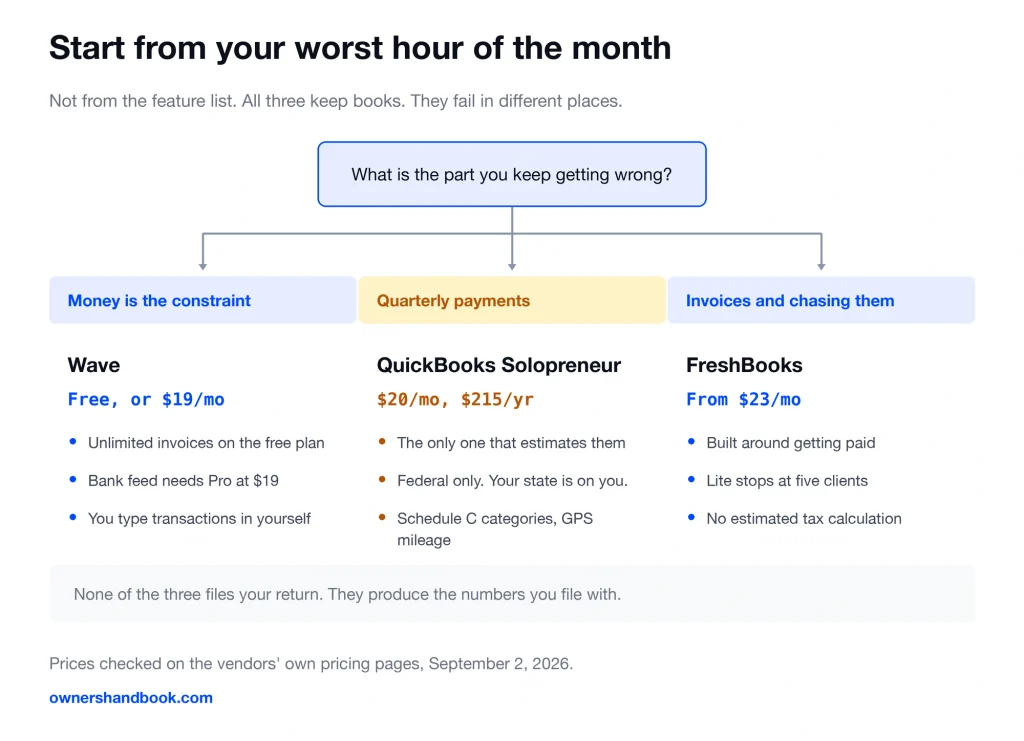
If you have no budget and only send a few invoices, Wave has a free plan that does the bookkeeping. If you drive for work, QuickBooks Solopreneur at $20 a month is the only one of the three that tracks mileage by phone GPS, and that deduction is usually worth more than the subscription. If your month is mostly invoices and chasing them, FreshBooks starts at $23 a month and is built around that job.
What the three actually are
Wave is bookkeeping plus invoicing with a genuinely free tier. Wave Pro is $19 a month, or $190 if you pay for the year.
QuickBooks Solopreneur is $20 a month, discounted to $10 for the first three months, so $210 the first year and $240 after that. Intuit built it for one person filing a Schedule C, the form sole proprietors use to report business profit.
FreshBooks Lite is $23 a month and caps you at five billable clients. Plus is $43, Premium is $70. There is no free plan, only a 30 day trial.
| What you are comparing | Wave | QuickBooks Solopreneur | FreshBooks Lite |
|---|---|---|---|
| Price | Free, or $19/mo for Pro | $20/mo. $210 first year, $240 after | $23/mo |
| Free tier | Yes. Starter is free. | A demo, not a plan. 2 invoices, 2 receipts, 5 mileage trips a month. | No. 30 day trial. |
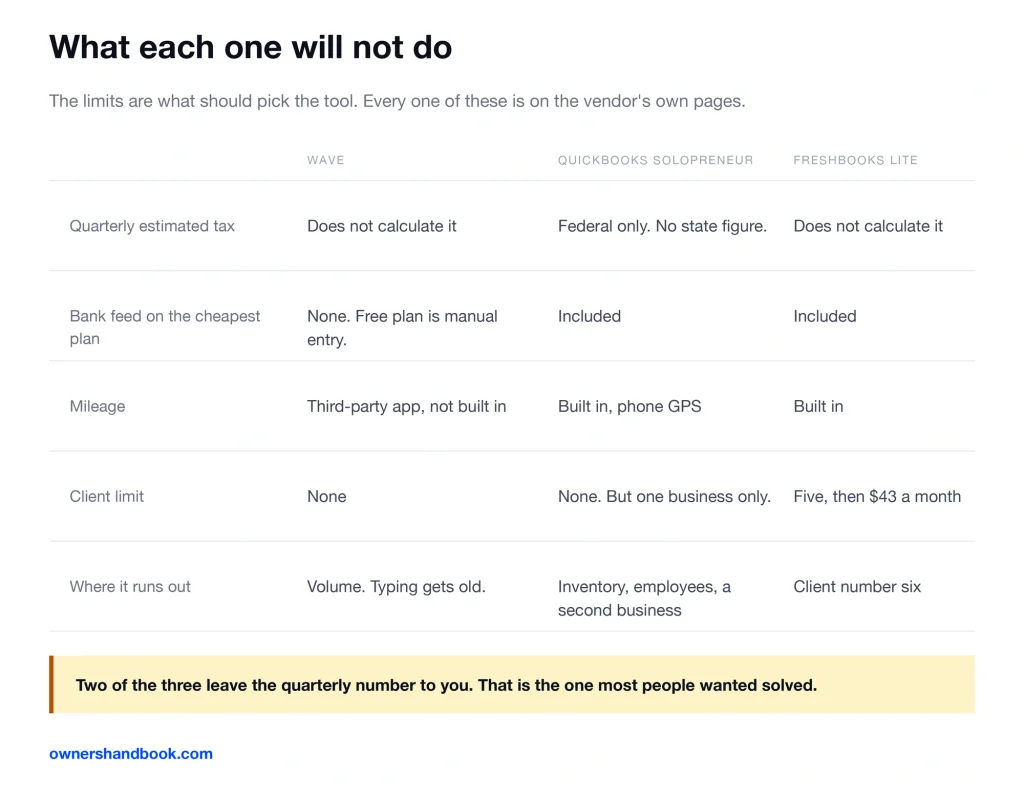
| Calculates quarterly estimated taxes | No. | Not advertised on the current Solopreneur pages. | No. |
| Built around Schedule C | Standard accounts you map yourself | Yes. Built for Schedule C filers. | Tax-friendly default categories |
| Bank feed | Pro plan only | Included | Included |
| Mileage tracking | Third-party integration | Built in, phone GPS | Built in |
| Card fee on invoices | 2.9% + $0.60 | 2.99% | 2.9% + $0.30 |
| Bank transfer fee | 1%, $1 minimum | 1%, no cap on newer accounts | 1% |
Wave, and who should not buy it
The free plan is real. Unlimited invoices, unlimited estimates, unlimited bookkeeping records, no time limit and no upgrade nag at a transaction count.
What free does not include is the bank feed. Automatic import and auto-categorization of bank transactions sit on the Pro plan, at $19 a month.
On the free plan you type transactions in yourself or upload a statement. That is fine at thirty transactions a month and miserable at three hundred.
The second limit matters more at tax time. Wave does not calculate your quarterly estimated tax payments. It gives you a profit number and stops there.
Mileage is the third gap. Wave points you to a separate app for that, rather than tracking it in the product.
Do not buy Wave expecting it to fix quarterly payments. It will give you clean books and leave the hardest arithmetic to you. That is not a mark against Wave in particular, because none of the three does this arithmetic now.
QuickBooks Solopreneur, and who should not buy it
This is the only one of the three that tracks mileage, and for anyone who drives to clients that single feature usually pays for the subscription several times over.
It tracks mileage by phone GPS and sorts expenses into Schedule C categories, the same categories that appear on the form you file.
One thing it no longer promises: the current Solopreneur pages do not advertise a quarterly estimated tax calculation. That belonged to QuickBooks Self-Employed, the product this one replaced. Assume the quarterly number is still your job, and check the feature list yourself before buying on the strength of it.
The product is deliberately narrow. It is for one owner with no employees. It does not do inventory, which lives on the Plus and Advanced tiers of QuickBooks Online.
It is also one business per subscription. If you shoot weddings and drive for a delivery app, that is two Schedule Cs and this is not the tool for both.
One more thing worth knowing before you start. Intuit says you can upgrade out of Solopreneur but cannot come back down to it later without a new subscription and setup.
Do not buy Solopreneur if you hold inventory, run two businesses, or expect to hire. You will outgrow it and the move is one way.
FreshBooks, and who should not buy it
FreshBooks is an invoicing product that grew accounting features, and it still shows in the best way. Sending, tracking, reminding, and getting paid is the part it is built around.
The catch is on the entry plan. Lite is $23 a month and stops at five billable clients. Client six means Plus at $43.
If you serve two retainer clients all year, five is plenty. If you do small jobs for twenty different people, the cheap plan is not the plan you will be on.
FreshBooks does not calculate quarterly estimated taxes either. Its default expense categories are built to line up with what you file, but it will not tell you what to pay in June.
Annual billing is advertised as an extra 10% off the monthly rate. The exact yearly totals are not printed on the pricing page.
Do not buy FreshBooks if your client list is long and your budget is short. The plan that fits your client count is not the price you saw first.
The fee that costs more than the subscription
Here is the part that gets left out of every comparison. For anyone who invoices, the subscription is not the main cost. The processor is.
Say you bill $60,000 across 24 invoices in a year. At 2.9% plus 30 to 60 cents, card payments cost you somewhere around $1,750.
That is seven times a year of Wave Pro. It is more than six years of the price difference between the cheapest and most expensive option here.
All three charge 1% for a bank transfer, which is ACH, the system your bank uses to move money account to account.
One percent of $60,000 is $600. Same money, same invoices, about $1,150 cheaper for the year.
So the real lever is not which logo is on your invoice. It is whether you make bank transfer the default option and card the exception.
Two footnotes. Wave Pro drops the 60 cent per transaction charge on your first ten card payments a month, which is worth about $14 a year at this volume.
And QuickBooks caps ACH fees at $10 only for payment accounts opened before September 2023. Newer accounts have no cap.
A spreadsheet is fine until about here
Nobody selling software will tell you this, so here is the line.
If you send fewer than five invoices a month, log fewer than about thirty business expenses a month, and run everything through one dedicated business bank account, a spreadsheet is genuinely enough.
Two tabs, income and expenses, with the expense tab using Schedule C category names. A folder of receipt photos. That is a complete set of records.
You cross the line when reconciling the bank statement takes longer than an evening, when you are chasing unpaid invoices by memory, or when you stop knowing your profit without adding it up.
Any of those three, and $20 a month is cheap.
What a year actually costs
Same business in all four rows. $60,000 invoiced, 24 invoices, every client paying by card.
| Plan | Subscription for the year | Card processing on $60,000 | Total |
|---|---|---|---|
| Wave Starter | $0 | $1,754 | $1,754 |
| Wave Pro, billed yearly | $190 | $1,740 | $1,930 |
| QuickBooks Solopreneur, first year | $210 | $1,794 | $2,004 |
| FreshBooks Lite, monthly | $276 | $1,747 | $2,023 |
The spread across all four is $269 for the year. The card fee inside every one of them is around $1,750.
Move those same clients to bank transfer and each total drops by roughly $1,150. Wave Starter lands at $600, FreshBooks Lite at $876.
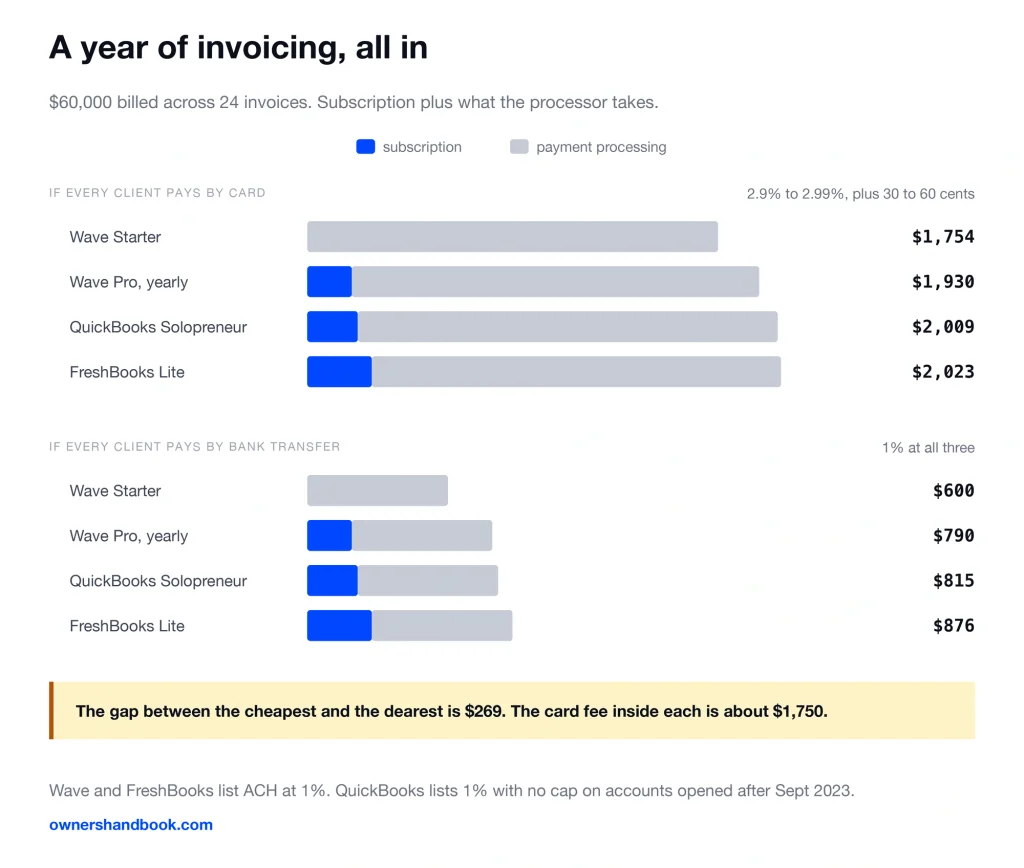
Which is the whole argument. Pick the tool that fixes your worst hour of the month, then go change how your clients pay.
Frequently asked questions
Can I connect my bank on Wave’s free plan?
No. Automatic bank import and auto-categorization are Pro features, at $19 a month. On the free Starter plan you enter transactions manually or upload a statement.
Does any of these file my tax return for me?
No. All three produce the numbers. Filing is separate software or a person, and QuickBooks sells that as an add-on rather than including it.
I have five clients. Is FreshBooks Lite enough?
Yes, exactly enough, with no room. Lite bills up to five clients and the sixth pushes you to Plus at $43 a month.
Is QuickBooks Solopreneur the same as QuickBooks Online?
No. It is a smaller, cheaper product for one Schedule C filer. Inventory, employees and multiple businesses all require a full QuickBooks Online plan.
Can I switch tools later without losing my records?
You can export your data from all three, but a mid-year switch means re-categorizing months of transactions. Intuit also warns that upgrading out of Solopreneur is one way.
Are these subscriptions and processing fees deductible?
Yes. The subscription is an ordinary business expense and the processor’s cut is too. Note that your income is the gross invoice amount, not what landed in your account.
Every price on this page was read off the vendor’s own pricing page in September 2026. Software pricing moves, and promotional rates expire. Check the current number before you sign up for anything.
A note on scope
This compares full bookkeeping tools. If all you need is to send an invoice and get paid, you are shopping in a different aisle, and the tradeoffs are covered separately in the invoicing software comparison. If your budget for all of this is zero, start at /free-tools-freelancers/ instead.
Sources
Wave, Pricing
https://www.waveapps.com/pricing
Wave, Payments
https://www.waveapps.com/payments
QuickBooks, Solopreneur
https://quickbooks.intuit.com/solopreneur
QuickBooks, Introduction to QuickBooks Solopreneur
QuickBooks, Automatically estimate your income tax
QuickBooks, Credit card processing fees and rates
https://quickbooks.intuit.com/payments/payment-rates
FreshBooks, Pricing
https://www.freshbooks.com/pricing
FreshBooks, Transaction fees for FreshBooks Payments (USD)
IRS, Estimated Taxes
https://www.irs.gov/businesses/small-businesses-self-employed/estimated-taxes
IRS, Instructions for Schedule C