What Upwork Actually Charges Freelancers Now (0% to 15%)
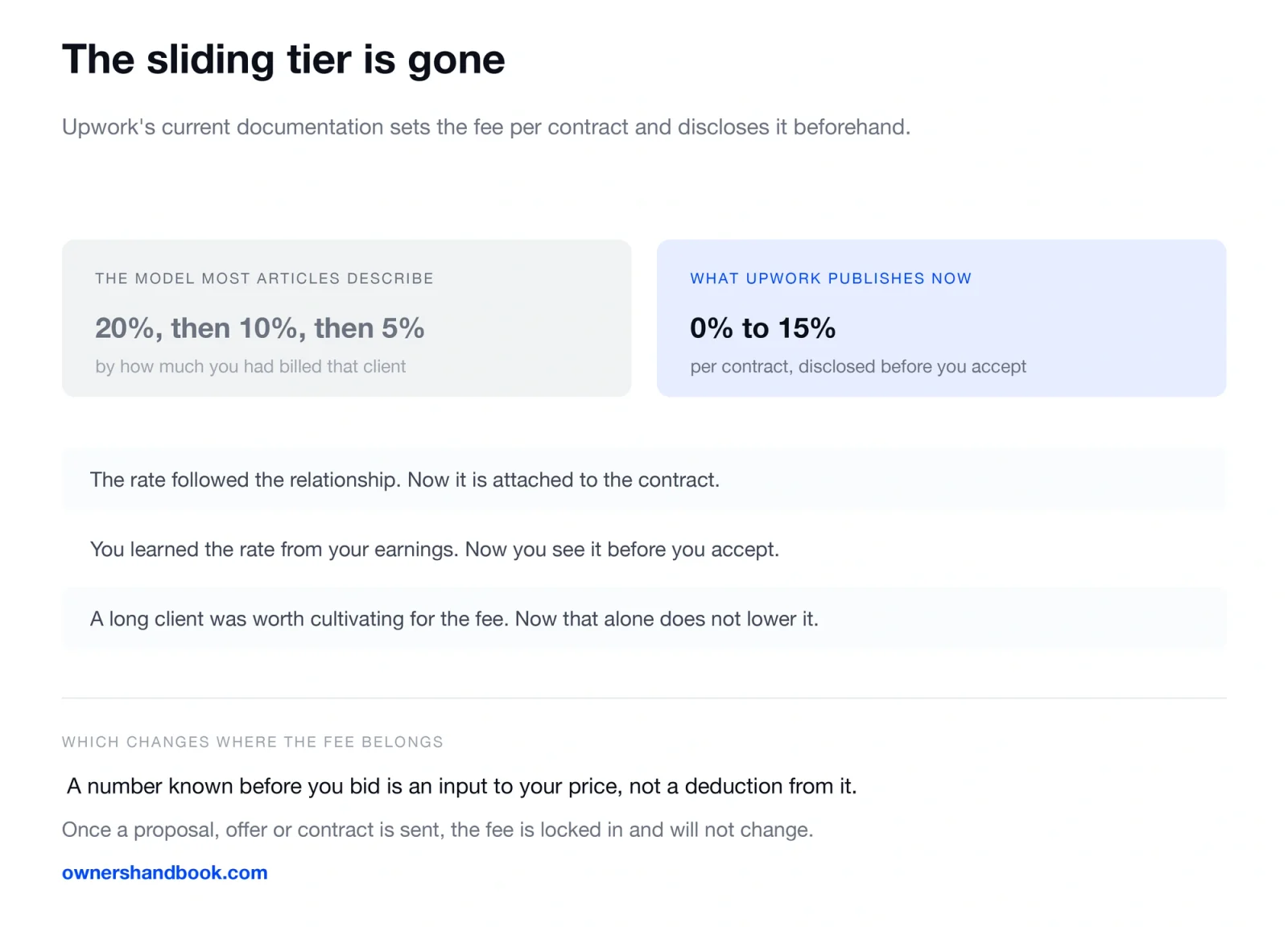
Almost everything written about Upwork’s freelancer fee describes a sliding scale — 20% on the first chunk of a client relationship, 10% after that, 5% above a threshold. That structure is gone. The current fee is set per contract, it is disclosed before you accept, and it does not move afterwards.
Here is what Upwork’s own documentation says, and what the fee does not cover.
The current structure, in Upwork’s words
Three sentences from Upwork’s support documentation settle it.
On the amount:
The fee ranges from 0% to 15% per contract, and helps us provide you with payment protection, fraud prevention, dispute resolution, and all the tools that help you run your business more smoothly.
On when you find out:
You’ll see the fee percentage when a client sends you an offer, or you are submitting a proposal, so you always know the exact fee that applies beforehand.
On whether it moves:
Once your contract begins, the fee is fixed and won’t change. Once a proposal, offer, or contract is sent, the Freelancer Service Fee is locked in and won’t change.
Three things follow from that, and they change how you should behave on the platform.
| What the old model meant | What the current one means |
|---|---|
| Your rate improved as you billed a client more | The rate is attached to the contract, not the relationship |
| You could not know the rate until you saw your earnings | You see the exact percentage before you accept |
| Long relationships were worth cultivating for the fee alone | A long relationship no longer lowers the fee by itself |
The disclosure point is the practical one. The fee is a known number at the moment you decide whether to bid, which means it belongs in your price rather than in your disappointment.
What this means for your rate
If the fee is visible before you accept, it is an input, not a deduction.
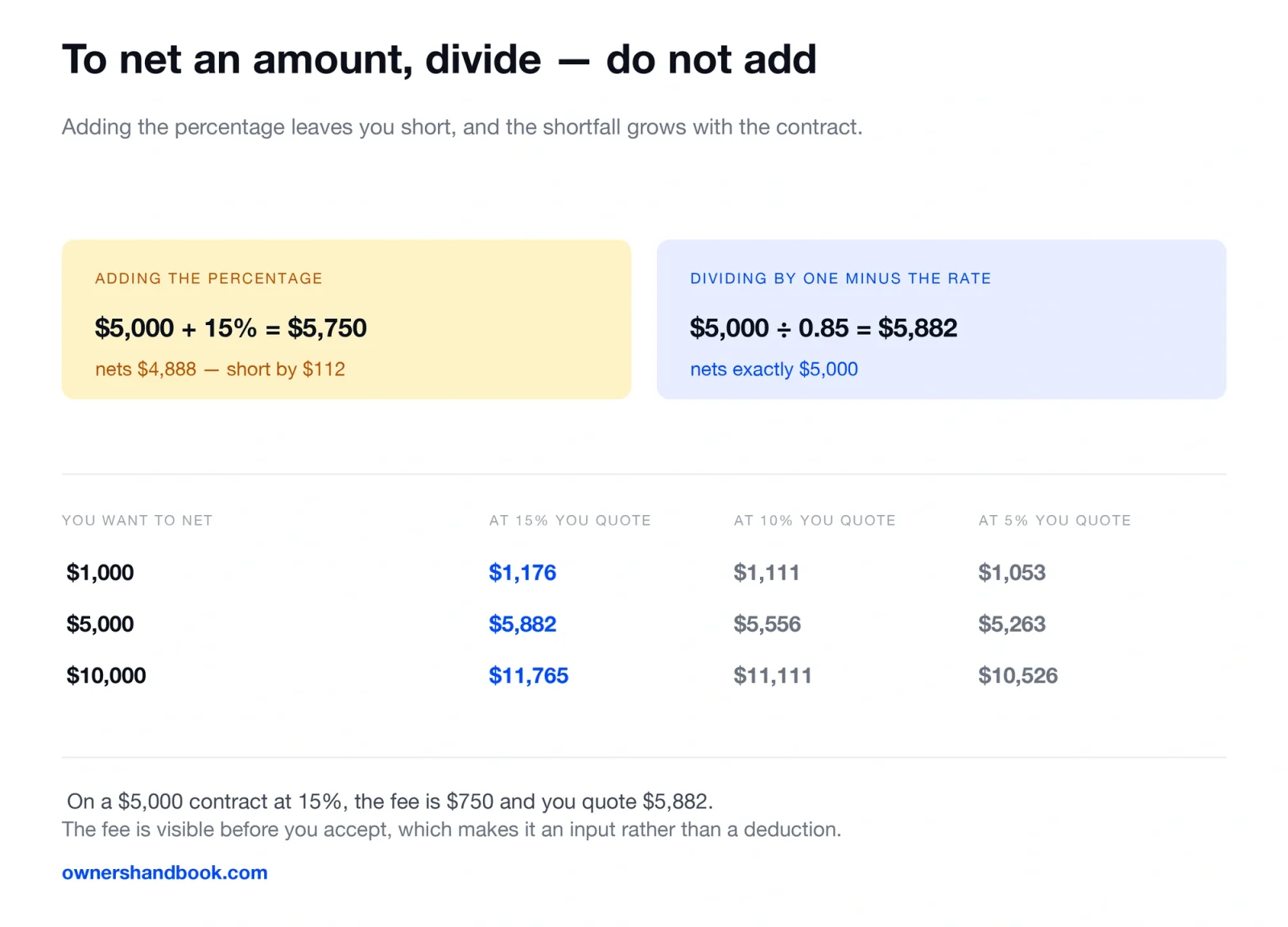
On a $5,000 contract at the top of the published range, 15% is $750. Pricing to net $5,000 means quoting $5,882, not $5,000 and then absorbing it.
| You want to net | At 15% you quote | At 10% you quote | At 5% you quote |
|---|---|---|---|
| $1,000 | $1,176 | $1,111 | $1,053 |
| $5,000 | $5,882 | $5,556 | $5,263 |
| $10,000 | $11,765 | $11,111 | $10,526 |
The arithmetic is dividing by one minus the rate, not adding the rate. Adding 15% to $5,000 gives $5,750, which nets $4,888 — short by $112, and the error grows with the contract.
Our guide to setting a freelance hourly rate covers the rest of what belongs in the number, and raising freelance rates covers moving it afterwards.
The fee clients pay, which is not yours
Upwork charges the client separately at the start of a contract, and this is frequently mistaken for a freelancer cost.
This is a fee clients pay when starting a new Marketplace or Project Catalog contract.
You pay a one-time Contract Initiation Fee ranging from $0.99 to $14.99 USD.
On hourly contracts Upwork charges it when the client makes the first payment; on fixed-price contracts, when the client funds the contract or first milestone.
It does not come out of your earnings. It is worth knowing about for a different reason: it is a small friction on the client’s side of starting a new contract, which is one more argument for scoping work into a single contract rather than several.
What the fee does not cover
The service fee is Upwork’s charge for the platform. Getting the money from Upwork into your bank account is a separate step with its own costs, and so is everything the tax system asks of you.
| Cost | Whose | Where it appears |
|---|---|---|
| Freelancer service fee | Yours | Deducted from each payment, 0% to 15% |
| Contract initiation fee | The client’s | Charged to them at contract start |
| Withdrawal or transfer charges | Yours | At payout, and they vary by method |
| Currency conversion | Yours | If you are paid in one currency and hold another |
| Self-employment tax | Yours | 15.3%, and no platform deducts it for you |
That last row is the one that reaches further than the platform fee. Nobody withholds anything from an Upwork payment. Our guide to self-employment tax covers where the 15.3% comes from, and the self-employment tax calculator works out the figure for your year.
The service fee is deductible. It is an ordinary business expense on Schedule C, which means the fee reduces your taxable profit. Report your gross earnings and deduct the fee, rather than reporting the net and quietly losing the deduction.
What arrives in January, and why it may not match
Platform income does not always generate the form people expect, and the thresholds changed for 2026.
A client paying you through Upwork is not paying you directly, so the payment generally reaches you through the platform rather than as a direct client payment. That routing is what decides which form, if any, shows up.
| Form | Threshold for 2026 |
|---|---|
| 1099-NEC, from a client who paid you directly | $2,000 or more |
| 1099-K, from a payment settlement entity | $20,000 and 200 transactions |
The 1099-NEC floor rose from $600 to $2,000 for tax years beginning after 2025 — the IRS instructions say the minimum “increased to $2,000 and may be adjusted for inflation beginning in calendar year 2027.” The 1099-K threshold went the other way: it had been scheduled to fall to $600 and was reversed back to the older, much higher figure.
Neither threshold changes what you owe. Income is reportable whether or not a form arrives, and your own records are the source. Our comparison of 1099-NEC and 1099-K covers which form reports what.
Reconcile against your own records, not against the form. A platform’s figure is typically gross — before the service fee came out. If you report the gross and forget to deduct the fee, you pay tax on money the platform kept.
Where a platform fee stops being the expensive part
Worth stating, because the fee is the number people fixate on.
A 15% platform fee on $40,000 of work is $6,000. Self-employment tax on the same profit is roughly $5,652 before any income tax. Underpricing by $10 an hour across a full year costs more than both.
The fee is a real cost and it belongs in your price. It is not usually the largest number on the page.
Frequently asked questions
Is the fee still 20%, 10% and 5%?
No. Upwork’s current documentation states a range of 0% to 15% set per contract and disclosed before you accept. The sliding tier described in most articles is an earlier structure.
Does the fee go down if I work with the same client for a long time?
Not by itself under the current model. The fee is attached to the contract and fixed once the contract begins.
Can I deduct the Upwork fee on my taxes?
Yes. It is an ordinary business expense on Schedule C. Report gross earnings and deduct the fee.
Do I get a 1099 from Upwork?
It depends on how the payments are classified and on the thresholds above. Do not wait for a form — report your income from your own records either way.
Should I quote higher to cover the fee?
Yes, and divide rather than add. To net an amount, divide it by one minus the fee rate. Adding the percentage leaves you short.
Does Upwork withhold any tax?
No. Nothing is withheld from your earnings, which is why the quarterly payment question exists at all. Our quarterly tax calculator works out the safe harbor.
Sources
Upwork, Freelancer Service Fees
https://support.upwork.com/hc/en-us/articles/211062538
Upwork, Contract Initiation Fee
https://support.upwork.com/hc/en-us/articles/26106318334611-Contract-Initiation-Fee
Upwork, Legal Center and Terms of Service
IRS, Instructions for Forms 1099-MISC and 1099-NEC
https://www.irs.gov/instructions/i1099mec
IRS, Instructions for Schedule C (Form 1040)