Invoicing Software for One-Person Businesses
Zoho Invoice and Square’s free plan both cost nothing, cover more invoices than a one-person business will send, and chase the client on their own once the due date passes. Invoice Ninja is free up to five clients.
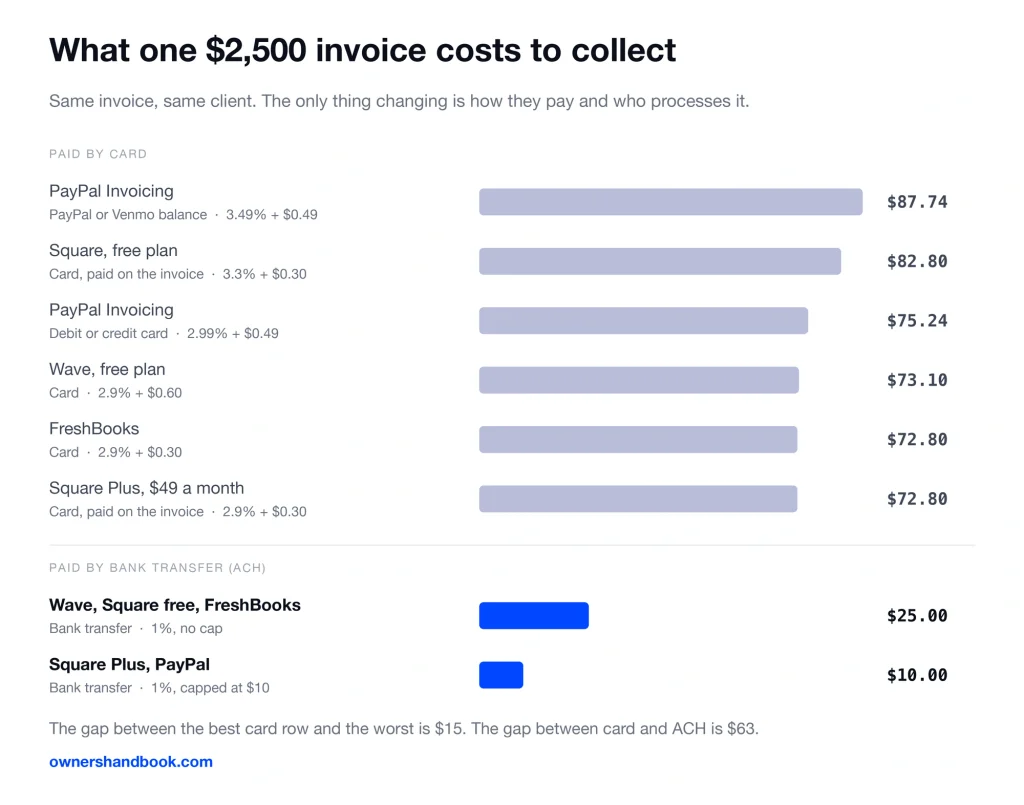
But the tool is not where your money goes. On a $2,500 invoice the fee is $73 to $88 by card and $10 to $25 by bank transfer.
The subscription is the small number
Say you bill $90,000 a year across 36 invoices of $2,500 each.
Every one of them paid by card at 2.9% plus 30 cents costs you $72.80. That is $2,620 for the year, gone before you see it.
The most expensive plan on this page is FreshBooks Premium at $70 a month, which is $840 a year. The processing fee is three times that.
Now switch the same 36 invoices to bank transfer, which is ACH — the network banks use to push money from one account to another. At 1% that is $25 each, or $900 for the year.
Same clients, same money, about $1,720 cheaper. You did not change software. You changed which button is easiest to click on the invoice.
So read the rest of this page in that order. The processing rate first, the free tier second, the monthly price last.
What each one costs
Every figure below was read off the vendor’s own pricing page on September 7, 2026.
| Tool | What it costs | Free tier | Who takes the processing fee |
|---|---|---|---|
| Wave | Free, or $19/mo ($190 a year) for Pro | Unlimited invoices | Wave. 2.9% + $0.60 card, 1% ACH ($1 minimum) |
| Zoho Invoice | Free. There is no paid tier. | 500 invoices a year | Your own gateway. Zoho charges nothing extra. |
| Invoice Ninja | Free, or $14/mo ($140 a year) for Pro | 5 clients, unlimited invoices | Your own gateway. Invoice Ninja charges nothing extra. |
| FreshBooks | $23, $43 or $70 a month | None. 30-day trial. | FreshBooks. 2.9% + $0.30 card, 1% ACH |
| Square Invoices | Free, or $49/mo for Square Plus | Unlimited invoices | Square. 3.3% + $0.30 online, 1% ACH ($1 minimum) |
| PayPal Invoicing | Free to create and send | Unlimited invoices | PayPal. 2.99% to 3.49% + $0.49, 1% ACH capped at $10 |
Two of these six never touch the money. Zoho Invoice and Invoice Ninja connect to an outside gateway — Stripe, PayPal, Square, Authorize.net — and your rate is whatever that gateway quotes you.
Zoho states plainly that it adds no fee of its own on top.
The other four are the processor. The rate in the table is the rate, and switching it means switching tools.
The free tiers, and the wall in each one
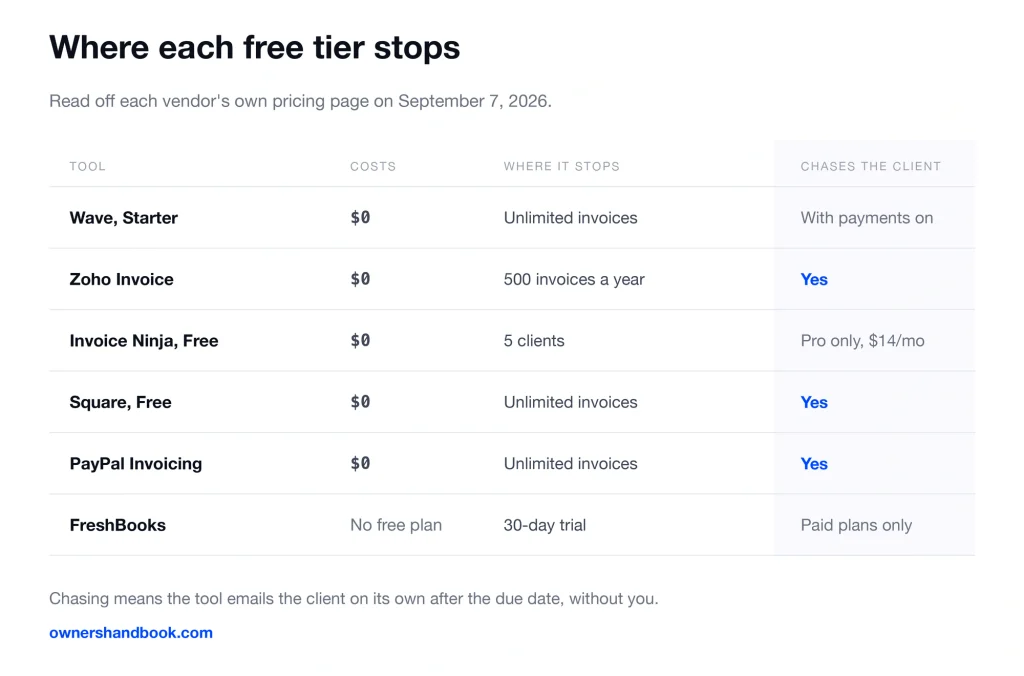
Wave’s Starter plan sends unlimited invoices and unlimited estimates, with no time limit and no upgrade nag. What it withholds is automation: recurring billing sits on the $19 Pro plan.
Zoho Invoice is the odd one. It is free with no upgrade path at all, capped at 500 invoices a year, two users and three projects. Every invoice carries a “Powered by Zoho Invoice” line.
Five hundred invoices a year is roughly ten a week. Almost nobody running a one-person business hits that.
Invoice Ninja’s free plan stops at five clients, and that is the tightest wall here. Invoices are unlimited, but client number six costs $14 a month. Free invoices also carry a “Created by Invoice Ninja” credit.
Square’s free plan is the most generous on features and the most expensive on rate. Unlimited invoices, recurring, deposits, estimates, contracts with e-signature — and 3.3% plus 30 cents when the client pays by card.
PayPal has no plan to choose. Creating and sending an invoice is free and you pay only when someone pays you, at the highest card rates in this group.
FreshBooks has no free plan. Lite is $23 a month for five billable clients, Plus is $43 for fifty, Premium is $70 for unlimited.
Recurring invoices and deposits
If you bill a retainer, recurring invoicing is the feature that decides this for you.
Zoho Invoice, Square’s free plan, PayPal and Invoice Ninja’s free plan all send recurring invoices at no cost. Wave does not — that is the Pro plan.
Deposits are the other half. Asking for 50% before you start is the single most effective thing you can do about a client who has not paid, and it only works if the tool can invoice a partial amount.
Invoice Ninja lists deposits and partial payments on its free plan. Square lists deposits on its free plan too, letting you take money up front and set a separate due date for the balance.
Square’s milestone payment schedules — one invoice split across several dated stages — are a Plus feature at $49 a month.
Wave handles deposits through estimates rather than through the invoice itself. FreshBooks lists deposits as a billing feature, and client retainers appear on Plus and above, not on Lite.
Whether it chases the client for you
This is the feature people underrate, and it is worth more than any other line on this page.
An automatic reminder is an email the software sends the client after the due date without you doing anything. It removes the worst task in freelancing, which is asking a grown adult for money twice.
Zoho Invoice, Square and PayPal all do it on the free tier.
Wave does it too, but with a condition. Wave’s own page says late payment reminders run with Wave’s online payments feature turned on, or on the Pro plan.
Invoice Ninja does not. Automatic late-payment reminder emails are a Pro feature, $14 a month or $140 a year.
FreshBooks does it, on a paid plan by definition.
Whatever you pick, set the reminder schedule the same day you set your payment terms. Net 30 with no reminder is just a slower way to be ignored.
What one invoice costs, side by side
Same $2,500 invoice in every row.
| How the client pays | Rate | Cost on a $2,500 invoice |
|---|---|---|
| PayPal, using a PayPal or Venmo balance | 3.49% + $0.49 | $87.74 |
| Square free plan, by card | 3.3% + $0.30 | $82.80 |
| PayPal, using a debit or credit card | 2.99% + $0.49 | $75.24 |
| Wave free plan, by card | 2.9% + $0.60 | $73.10 |
| FreshBooks or Square Plus, by card | 2.9% + $0.30 | $72.80 |
| Wave, Square free or FreshBooks, bank transfer | 1%, no cap | $25.00 |
| Square Plus or PayPal, bank transfer | 1%, capped at $10 | $10.00 |
The spread across all six tools on card is $15. The spread between card and bank transfer is $63 on the same invoice.
One more row worth knowing. If you key a client’s card in by hand or charge a saved card, Square charges 3.5% plus 15 cents, which is $87.65 on this invoice.
When paying actually pays
Square Plus costs $588 a year and buys you two things: card at 2.9% instead of 3.3%, and a $10 cap on bank transfer fees.
On card volume alone the rate cut is 0.4%. You need about $147,000 running through Square by card before $588 comes back.
On bank transfers the cap is sharper. A $2,500 ACH payment costs $25 on the free plan and $10 on Plus, so each one saves $15. Forty of those a year and the plan has paid for itself.
Wave Pro at $19 a month drops the 60 cent per-transaction charge on your first ten card payments a month. That is $6 of fee relief against $19 of subscription, so buy Pro for recurring billing, not for the rate.
Invoice Ninja Pro at $140 a year is the cheapest way to buy automatic reminders in this group, and it lifts the five-client cap at the same time.
Pick this if
You want a free tool that chases the client for you and you do not mind a credit line on the invoice: Zoho Invoice.
You have four or five clients and already run a Stripe or PayPal account you want to keep: Invoice Ninja.
You want contracts, e-signature and deposits in the same free account: Square.
Most of your clients will pay by bank transfer: PayPal or Square Plus, because both cap ACH at $10 while everyone else charges an uncapped 1%.
You already keep books somewhere and only need invoices out the door: Wave’s free plan.
Invoicing is genuinely your main administrative job and you will pay to have it done well: FreshBooks.
If what you actually need is bookkeeping rather than invoicing, that is a different comparison, and there is separate accounting software built for it. There is also a roundup of the free tools that cover the rest of year one.
Disclosure: I run Mozey, which also does invoicing, and what it does is described at /mozey-what-it-is/.
Frequently asked questions
Is Zoho Invoice really free with no catch?
The catch is the caps and the branding. Five hundred invoices a year, two users, three projects, and “Powered by Zoho Invoice” printed on what you send. There is no paid upgrade of Zoho Invoice to remove them.
Can I make bank transfer the only payment option?
In most of these you can enable ACH and leave card off, or enable both and list bank transfer first. Some clients will still ask to pay by card.
Charging them extra for it is a separate decision, and some states restrict card surcharges.
Do these fees come out of my taxable income?
No. Your income is the full invoice amount, not what landed in your account. The processing fee is a deductible business expense recorded separately, so both numbers appear in your books.
Which of these lets a client pay part of an invoice?
Invoice Ninja lists deposits and partial payments on its free plan, and Square lists deposits on its free plan. Square’s milestone payment schedules require Square Plus at $49 a month.
Is PayPal Invoicing worse than the others?
On rate, yes. On friction, no. If a client already has a PayPal account, sending them a PayPal invoice is the shortest path to being paid, and 3.49% of a paid invoice beats 0% of an unpaid one.
What happens to my invoice history if I switch tools?
Check the export before you commit, and check it in the format your next tool imports. What never travels is the client’s saved payment method, so anyone on autopay has to re-enter their details.
Sources
Wave, Pricing
https://www.waveapps.com/pricing
Wave, Payments
https://www.waveapps.com/payments
Wave, Invoicing
https://www.waveapps.com/invoicing
Zoho Invoice, Pricing
https://www.zoho.com/us/invoice/pricing
Zoho Invoice, Accept online payments
https://www.zoho.com/us/invoice/accept-online-payments
Invoice Ninja, Pricing
FreshBooks, Pricing
https://www.freshbooks.com/pricing
FreshBooks, Transaction fees for FreshBooks Payments (USD)
Square, Invoices pricing
https://squareup.com/us/en/invoices/pricing
Square, Payment processing fees
https://squareup.com/us/en/payments/our-fees
PayPal, Merchant fees
https://www.paypal.com/us/webapps/mpp/merchant-fees
PayPal, Invoicing