The Free Tools That Get You Through Year One
You do not have to buy anything in your first year. A freelance business has five jobs to cover — send invoices and get paid, keep a ledger, pay the IRS, keep receipts, remember the dates — and every one of them has a free answer that is good enough to carry a real business. Wave’s free plan sends the invoices and holds the books. A spreadsheet is the ledger. IRS Direct Pay takes the quarterly payments with no account at all. Your phone is the receipt scanner. Your calendar is the deadline system.
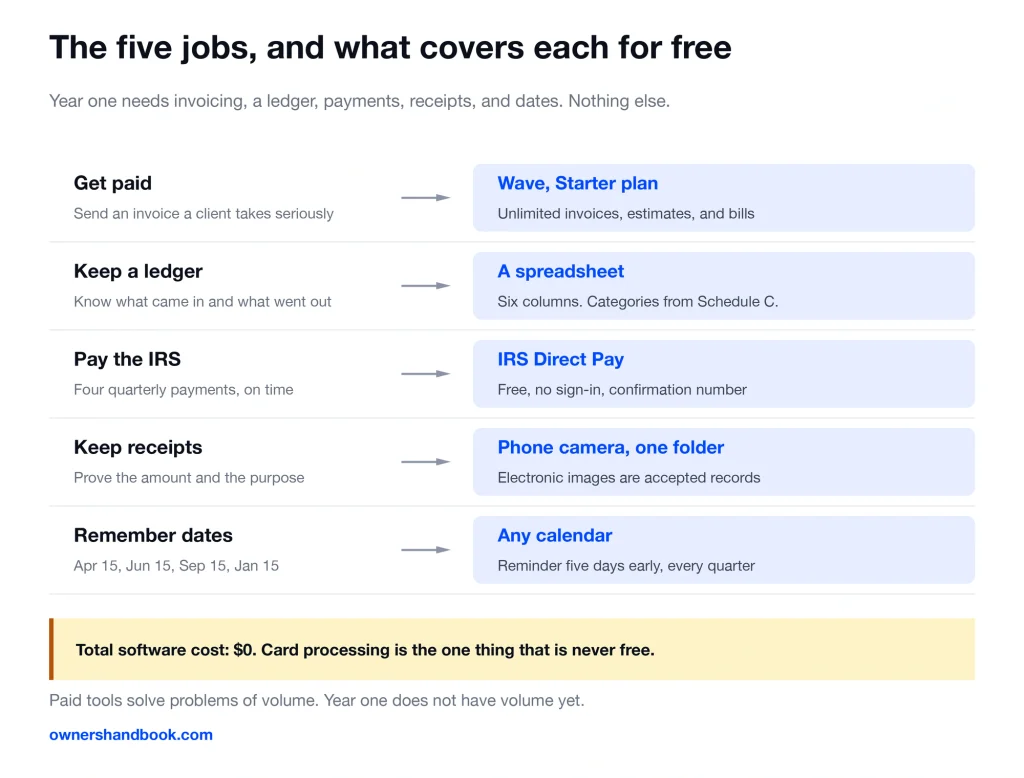
Five jobs, and the free answer to each
Almost every article on this subject is selling something. This one is the opposite, and that is the point.
Paid software solves problems of volume. In year one you do not have volume yet. You have eleven invoices and a shoebox.
| The job | The free tool | What it costs |
|---|---|---|
| Send invoices and get paid | Wave, Starter plan | $0 to create and send |
| Keep a ledger | A spreadsheet, or Wave’s books | $0 |
| Pay the IRS | IRS Direct Pay | $0, no sign-in |
| Keep receipts | Phone camera, one cloud folder | $0 |
| Remember the dates | Any calendar, with reminders | $0 |
| See what the IRS has on you | IRS Online Account | $0 |
| File the return | IRS Free File, at or under $89,000 AGI | $0 |
Nothing on that list is a stripped demo of a paid thing. Direct Pay and Free File are the government’s own systems. The spreadsheet is the same ledger an accountant would build you.
Set the whole stack up in one afternoon
Seven steps. Each one takes minutes, and the order matters a little.
1. Open a second checking account at your existing bank and run every business dollar through it. This is the single change that does most of your bookkeeping for you.
2. Create a free Wave account and send your first invoice from it. Starter includes unlimited invoices, estimates, bills, and bookkeeping records, plus the mobile app.
3. Make one spreadsheet with two tabs, Income and Expenses. Google Sheets is free with any Google account. Six columns each: date, who, amount, category, payment method, and a note saying what it was for.
4. Use the Schedule C expense categories as your category list. Advertising, contract labor, office expense, supplies, travel, meals. Sorting once beats sorting twice.
5. Create one cloud folder per tax year, with four folders inside: Income, Expenses, Vehicle, Filings. Photograph every receipt the day it exists.
6. Put the four estimated tax dates in your calendar with a reminder five days early. April 15, June 15, September 15, and January 15 of the following year.
7. Set a weekly fifteen-minute repeating event. Log the week, file the receipts, done.
That is the whole system. It has no subscription, no trial expiring, and no vendor who can change the terms on you.
The two IRS accounts, and what each is for
These are the least-known free tools in the stack, and the two most worth setting up.
IRS Direct Pay moves money from your checking or savings account to the IRS. It is free, and it requires no sign-in.
It verifies you against a prior-year return instead, which is why it is the fastest way to make a quarterly payment. You get a confirmation number for every payment.
You can schedule a payment up to 365 days ahead, and change or cancel it up to two business days before the date. Five payments per 24 hours.
Two real limits. It takes bank accounts only, never a card. And if you have never filed a federal return, it cannot verify you, so you pay another way.
IRS Online Account is the other half. It is the record of what the IRS thinks happened.
It shows your balance by tax year, five years of payment history, pending and scheduled payments, transcripts, and digital notices. Setting it up requires verifying your identity with a photo ID.
Direct Pay sends the money. Online Account proves it arrived. Together they cover a job that paid software charges for and does worse.
Where free stops
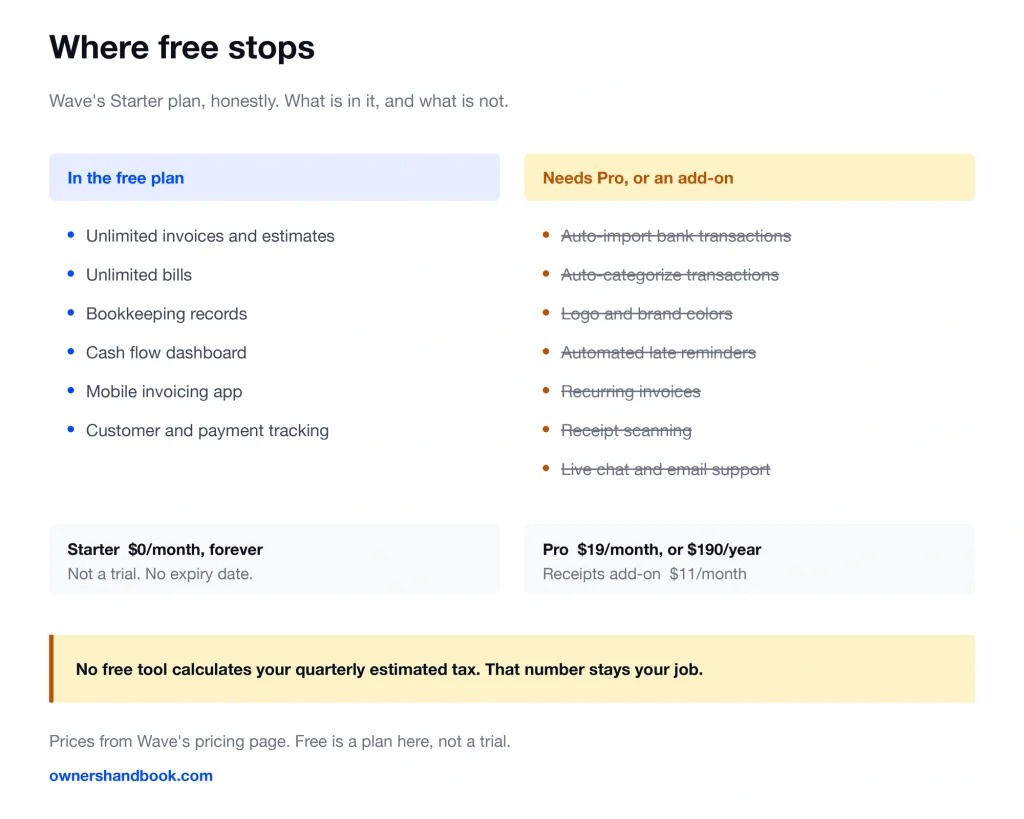
Being honest about the ceiling is the only way this advice is worth anything.
Wave’s free Starter plan does not import your bank transactions. You type them in, or you export a CSV and paste.
It does not auto-categorize, does not put your logo on the invoice, and does not send automated late payment reminders. Recurring invoices are a Pro feature.
Receipt scanning is not in the free plan either. It is an add-on at $8 a month, or included with Pro at $19 a month or $190 a year.
| What you might want | Free Starter plan | Where it actually lives |
|---|---|---|
| Unlimited invoices, estimates, bills | Included | Free |
| Bookkeeping records and dashboard | Included | Free |
| Mobile invoicing app | Included | Free |
| Auto-import bank transactions | Not included | Pro, $19/month or $190/year |
| Auto-categorize transactions | Not included | Pro |
| Logo and brand colors on invoices | Not included | Pro |
| Automated late payment reminders | Not included | Pro |
| Recurring invoices | Not included | Pro |
| Receipt scanning | Not included | Add-on $8/month, or Pro |
| Live chat and email support | Not included | Pro |
One more ceiling that matters more than any of those. No free accounting tool calculates your quarterly estimated tax for you. That number stays your job.
Free File has its own edges. The guided software is for adjusted gross income of $89,000 or less, and each partner sets extra rules on top of that.
Above that income, you get Free File Fillable Forms — electronic versions of the paper forms, with limited calculations and no state filing.
Receipts are the one place free has no ceiling at all. The IRS accepts electronic records, provided the system stores and reproduces them in legible form and you can hand them over. A photo in a named folder qualifies.
Payment processing is never free
The software can be free. Moving money never is, and any article that implies otherwise is not counting.
Through Wave, a client paying by credit card costs 2.9% plus $0.60. American Express is 3.4% plus $0.60. A bank payment is 1%, minimum $1.
On a $3,000 invoice, that is $87.60 by card or $30 by bank transfer. Offer bank payment and say so on the invoice.
The IRS charges the same way if you pay by card. Debit is a flat fee around $2.10 to $2.15 depending on the processor, and credit runs 1.75% to 1.85% with a $2.50 minimum.
No part of that fee goes to the IRS. It goes to the processor, which is why Direct Pay from a bank account is the right default.
These fees are deductible. Put them in Part V of Schedule C, where most freelancers forget them.
When it is time to start paying
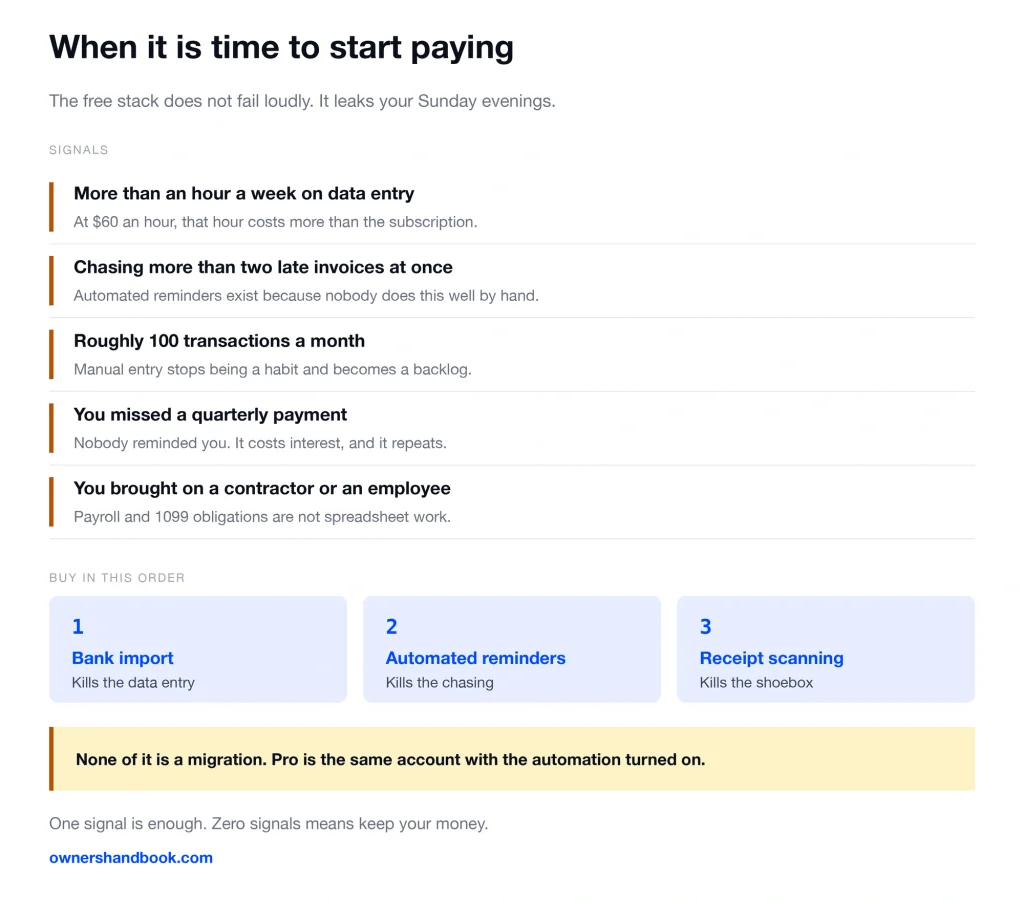
The free stack does not fail loudly. It fails as a slow leak of your Sunday evenings. Watch for these five signals.
You are spending more than an hour a week on data entry. At $60 an hour, that hour is worth more than any subscription on the list.
You are chasing more than two late invoices at once. Automated reminders exist because doing it by hand is a job nobody does well.
You crossed roughly 100 transactions a month. Manual entry stops being a habit and starts being a backlog.
You missed a quarterly payment because nobody reminded you. That mistake costs interest, every time, and it repeats.
You brought on a contractor or an employee. Payroll and 1099 obligations are not spreadsheet work.
When one of those is true, buy in this order: bank import first, then automated reminders, then receipt scanning. Those three cover most of the leak.
Two of the tools you already have handle the upgrade without a migration. Wave’s Pro plan is the same account with the automation turned on, and your spreadsheet exports to anything.
If you get to that point, the next question is which paid tool, and that is a comparison worth reading before you subscribe to anything. It is also a question you do not have to answer today.
The same logic applies to the return itself. One Schedule C and one state is a job free or cheap software handles. The day that stops being true, an enrolled agent is usually the cheaper answer before an accountant is.
Frequently asked questions
Is Wave’s free plan actually free, or a trial?
It is a permanent plan, not a trial. The Starter plan includes unlimited invoices, estimates, bills, and bookkeeping records at no cost; automation features and receipt scanning are what sit behind the Pro plan.
Do I need an IRS account to pay my quarterly taxes?
No. Direct Pay requires no sign-in and verifies you against a prior-year return instead. An Online Account is still worth having, because it is where you confirm the payment posted.
Can I really use a spreadsheet instead of accounting software?
Yes. The IRS says you may choose any recordkeeping system that clearly shows your income and expenses. A spreadsheet with dates, amounts, categories, and a purpose note meets that standard.
Will the IRS accept a photo of a receipt?
Yes, if your storage system keeps the images legible, complete, and retrievable when asked. The rules for electronic records are the same as for the paper they replaced.
What is the income limit for filing my return for free?
Guided Free File software is for adjusted gross income of $89,000 or less. Above that, Free File Fillable Forms is open to any income level, but it does limited calculations and has no state filing.
Is any of this free stack going to be a problem to move off later?
No. Wave’s paid plan is the same account with more turned on, and a spreadsheet exports to every tool that exists. Nothing here locks you in.
Sources
IRS, Direct Pay with bank account
https://www.irs.gov/payments/direct-pay-with-bank-account
IRS, Direct Pay help
https://www.irs.gov/payments/direct-pay-help
IRS, Online account for individuals
https://www.irs.gov/payments/online-account-for-individuals
IRS, IRS Free File: Do your taxes for free
https://www.irs.gov/filing/irs-free-file-do-your-taxes-for-free
IRS, 2026 tax filing season opens with several free filing options available
https://www.irs.gov/newsroom/2026-tax-filing-season-opens-with-several-free-filing-options-available
IRS, Pay your taxes by debit or credit card
https://www.irs.gov/payments/pay-your-taxes-by-debit-or-credit-card
IRS, Recordkeeping
https://www.irs.gov/businesses/small-businesses-self-employed/recordkeeping
IRS, Publication 583, Starting a Business and Keeping Records
https://www.irs.gov/publications/p583
IRS, Estimated tax payment due dates
https://www.irs.gov/faqs/estimated-tax/individuals/individuals-2
Wave, Pricing
https://www.waveapps.com/pricing
Wave, Invoicing
https://www.waveapps.com/invoicing
Google, Sheets